How to Write an Invoice Email (+ Free Editable Templates)


It’s not you. It’s them. But sometimes, it is you… or, more specifically, your invoice email.
Late or missed payments aren’t always about unwilling clients. Sometimes, it’s about not being clear on what the payment is for, when it’s due, or how to send it.
A vague message leaves your clients guessing and slows down your cash flow. A strong invoice email walks your clients through the process and gets you paid fast.
Here’s how to write an invoice email that gets noticed, opened, and paid. The key is to strike the perfect balance between polite and persuasive. We’ll give you examples, practical tips, and some templates you can customize.
Table of Contents
What Is an Invoice Email?
An invoice email is the piece of text that goes with the invoice you send to clients. It explains what the invoice covers and when the payment is due. It also gives them instructions on how to pay or settle the invoice.
Don’t get the terms confused, though. The invoice is the formal document listing what clients owe you. The invoice email is the message that gives it more context so that clients can understand and act on it.
Invoice emails influence how clients perceive your business. Your goal is to get paid on time. Sure. But it’s important to know how to approach your clients in a way that would encourage them to do so.
What Every Effective Invoice Email Should Include
An invoice email informs your clients and guides them through a smooth payment process. It’s not enough to have the invoice file attachment in an email with a few vague words. It has to have a clear structure and professional tone. Here are the elements that go into a great invoice email:
Subject Line
The subject line is the first thing your clients see in their notifications. So, it should tell them what the email is about at first glance. A simple and straightforward subject reduces confusion. It also prevents the email from getting lost or buried in your client’s inbox.
Greeting
An invoice is part of doing business, but your email doesn’t have to sound purely transactional. To set the right tone, it’s important for greetings to be friendly but professional. Emails with a simple, personalized greeting perform better than those with a cold and generic opener.
Opening Line
The opening line is often just a reminder of what the invoice is for. There may also be a cue confirming the name and format of the attached file. It sets the purpose of the email and gives the clients a quick context of what they can find in the actual invoice.
Invoice Summary
The invoice summary lets your clients skim through the email without having to open the file. It contains details like invoice number, total amount, and due date. Things tend to get busy, so having these basic details also makes it easier for clients to find what they need at a glance.
Payment Instructions
Actionable invoice emails include details on how clients can complete their payment. With simple and complete instructions, the process becomes more seamless. That means less chances of late or missed payments.
Closing Line
The closing line is often an expression of gratitude for your client’s continued business with you. It helps you end on a positive note by showing clients you appreciate their prompt compliance. This touch of politeness and professionalism also strengthens customer relationships.
Email Signature or Sign-Off
The main purpose of an email sign-off is to confirm who the message is from. It also provides clients with details on how to contact you. A complete signature makes you more trustworthy since it shows clients that they can reach out to you for any concerns.
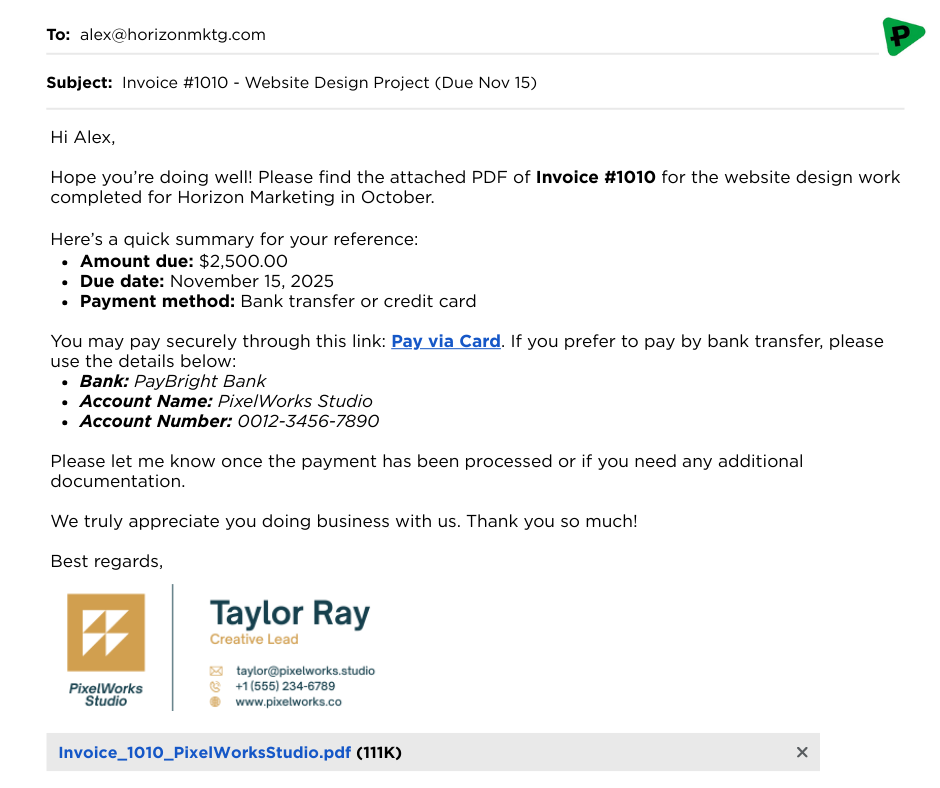
How to Write an Invoice Email (Step-by-Step)
Now that you know the elements of a good invoice email, it’s time to learn how to put them together in the right order. Here’s a step-by-step guide on how to write an invoice email:
- Write a Clear Subject Line
“Invoice attached” is something that gets buried in your client’s inbox. What you want is something that gets noticed right away. So, make sure your subject line contains the invoice number and due date.
- Open with a Warm Greeting and Important Context
Steer away from generic greetings like, “Dear Client” or “Good day!” Instead, add a little warmth and personal touch by addressing your client by name.
Then, provide a short but polite introduction. One sentence should be enough to inform them of the services and period the invoice covers.
- Provide Invoice Summary and Payment Instructions
Include the key details of the invoice for clarity and convenience. These include the invoice number, total amount, and due date for the payment.
Then, guide your clients in settling the invoice. Let them know their payment options. Bank transfer, credit card, payment link… everything. Add your account details or a direct link to the payment page.
- Attach the Invoice File
Don’t forget to attach the actual invoice file to the email. And always double-check the attachment before sending the email.
It’s best to stick to a PDF format to prevent edits and keep the data consistent. The file name should also have the invoice number and your business name, if possible. This makes the file easy to find and identify.
- End with a Polite Closing Line and Complete Signature
The end of your invoice email is just as important as the beginning. To wrap it up nicely, add a sentence to thank the client for doing business with you. You may also ask them to get back to you with the remittance advice once the payment has been made.
Finally, sign off the email. Include your name, job title, company name, and contact details. It would be best to use an official signature with the company logo for a more professional touch.
Ready to Use Invoice Email Templates for Every Situation
As promised, here are some templates you can copy, customize, and send, depending on the situation. Apart from the general format, you’ll also find invoice emails tailored for new and returning clients. We’ve also included a template for following up on late payments.
Standard Invoice Email Template
Subject: Invoice #[Invoice Number] for [Service/Project Name] – Due [Due Date]
Hi [Client Name],
I hope you’re doing well. Please find attached the invoice for [Service/Project Name] completed on [Date].
- Invoice Total: [Amount]
- Due Date: [Due Date]
- Payment Options: [Payment Method / Link]
Please let me know if you need any additional details or supporting documents.
Thank you again for your business!
Best regards,
[Your Name]
[Your Business Name]
[Your Contact Info]
For New Clients
Subject: Invoice #[Invoice Number] for [Service/Project Name] – Due [Due Date]
Hello [Client Name],
It was a pleasure working with you on [Project Name]. Attached is the invoice for the work completed on [Date].
- Invoice Total: [Amount]
- Due Date: [Due Date]
- Payment Options: [Payment Method / Link]
Please feel free to reach out if you have any questions. I’d be happy to assist.
Thank you so much for choosing [Your Business Name]! Looking forward to working with you again soon.
Best regards,
[Your Name]
[Your Business Name]
[Your Contact Info]
For Returning Clients or Recurring Invoices
Subject: Invoice #[Invoice Number] for [Service/Month] – Due [Due Date]
Hi [Client Name],
I hope things are going well on your end! Attached is this month’s invoice for [Service/Subscription] completed on [Date].
- Invoice Total: [Amount]
- Due Date: [Due Date]
- Payment Options: [Payment Method / Link]
Please let me know if there are any changes to your billing details or payment schedule.
As always, thank you for your continued trust and partnership.
Best,
[Your Name]
[Your Business Name]
[Your Contact Info]
For Past-Due Follow-Ups
Subject: Friendly Reminder: Invoice #[Invoice Number] Overdue — Action Needed
Hi [Client Name],
I hope you’re doing well. I wanted to check in regarding Invoice [Invoice Number], which was due on [Original Due Date].
If you’ve already processed the payment, please disregard this message. Otherwise, you can complete the payment here: [Payment Link].
- Total Amount Due: [Amount]
- New Due Date (if applicable): [Revised Due Date]
Please let me know if you need me to resend the invoice or if there’s any issue with the payment process. I’d be happy to help.
Thank you in advance! I appreciate your prompt attention to this matter.
Best regards,
[Your Name]
[Your Business Name]
[Your Contact Info]
Sending Your Invoice Email
Not a lot of people realize the importance of timing when sending out invoice emails. There’s actually a “good” time to send the email and ensure it gets noticed. Let’s walk through when and how to send invoice emails so you get paid on time.
When Is the Best Time to Send an Invoice Email?
As a rule of thumb, the sooner you send out the invoice, the sooner you can get paid.
If your work is project-based, it’s best to send the invoice email right after you complete the project. This schedule also applies to freelancers and small businesses.
If you’re handling multiple clients and recurring projects, it’s best to send the email at a predictable schedule. This demonstrates consistency and clarity for clients.
Tip: Avoid sending invoice emails on late Fridays, weekends, or holidays, especially for a B2B company. Otherwise, your email might get buried under the influx of emails on the next working day.
Reminder Emails
A gentle reminder can go a long way in keeping your payments on track. Send a friendly check-in:
- A few days before the due date
- On the due date itself
- Within a week after the due date if the payment hasn’t come through
This rhythm keeps your communication professional and proactive without coming off as pushy.
Extra: Templates for Sending Out Reminders
Before the Due Date
Subject: Quick Reminder: Invoice #[Invoice Number] Due on [Due Date]
Hi [Client Name],
I hope you’re doing well. Just a quick reminder that Invoice #[Invoice Number] for [Service/Project Name] is due on [Due Date].
- Amount Due: [Amount]
- Payment Options: [Payment Method / Link]
No action needed yet! I just wanted to make sure this is on your radar in case your team processes payments ahead of time.
Please let me know if you need any additional details.
Thank you so much! I truly appreciate the opportunity to work with you.
Best regards,
[Your Name]
[Your Business Name]
[Your Contact Info]
On the Due Date
Subject: Invoice #[Invoice Number] Due Today — [Amount]
Hi [Client Name],
I wanted to remind you that Invoice #[Invoice Number] for [Service/Project Name] is due today. You can complete the payment using the details below:
- Amount Due: [Amount]
- Payment Options: [Payment Method / Link]
If payment has already been arranged, please disregard this message. Otherwise, I’d appreciate it if you could confirm once it’s been processed.
Thanks again for your prompt attention!
Best,
[Your Name]
[Your Business Name]
[Your Contact Info]
Common Mistakes to Avoid

Even the best-written invoices can fall flat if your email misses the basics. Here are a few common pitfalls that can slow down payments — or worse, make your email easy to ignore.
- Forgetting to attach the invoice
It’s a simple slip, but it’s one that can delay payment by days. Always double-check that your invoice file is attached and named clearly before hitting send.
- Using vague subject lines
A subject line like “Invoice” or “Payment due” doesn’t tell your client what it’s about. Clear, specific subjects help your email stand out in busy inboxes.
- Leaving out payment terms or due dates
Without a due date, your invoice has no timeline. And more importantly, your client has no urgency to pay. Always make payment expectations clear and visible.
- Not specifying currency or payment method
Especially for international clients, this small detail prevents confusion and back-and-forth emails.
- Sending from a personal or unbranded email address
An invoice from “janedoe@gmail.com” looks less professional than one from your business domain. It can also raise trust or security concerns.
- Sounding too casual or too demanding
Striking the right tone matters. Too casual can feel unprofessional, and too pushy can damage relationships. Aim for friendly confidence that’s polite, clear, and firm.
Pro Tips to Get Paid Faster
Getting paid on time isn’t just about sending an invoice. It’s about removing friction at every step between “sent” and “settled.” These small changes compound fast.
Use automation to send and track invoices.
Automation removes human delay. Scheduled sends, open tracking, and automatic reminders. These keep invoices moving without awkward follow-ups or manual effort.
Adopt clear invoice naming conventions.
A clean file name helps your invoice move through finance teams faster. When your invoice is easy to identify, it’s easier to approve and pay.
Offer multiple payment methods.
The more options you offer, the fewer excuses you hear. Bank transfer, card payments, and digital wallets reduce friction and speed up settlement.
Keep emails short, but human.
Long emails get skimmed. Cold emails get ignored. Clear, concise language with a polite tone makes it easier for clients to act quickly.
Think beyond the invoice.
Late payments often signal a larger cash flow issue. If you want to go deeper, this guide breaks down what’s happening behind the scenes: Fix Cash Flow Fast: DSO Formula for Finance Leaders.
Make Every Invoice Email Count

Invoice emails may feel routine, but they shape how quickly you get paid and how professional your business feels to clients. When your message is clear, timely, and easy to act on, payments move faster and conversations stay smooth.
The difference is rarely the invoice itself. It’s the email that delivers it.
That’s why small improvements matter. A clearer subject line. A tighter message. A consistent follow-up rhythm. Together, they turn invoice emails from an afterthought into a reliable system.
Save the templates. Reuse what works. And if you’re sending invoices at scale, take the manual work out of the process. Automation helps you send, track, and follow up without chasing payments or second-guessing what was sent.
Take the faster route to sending and tracking invoices. Get in touch with Paycile today! Because it’s not about doing more. It’s about letting the right systems do the work for you.